

Coordinate System
Coordinate Frames and XYZ Calculation
Ouster uses two coordinate frames:
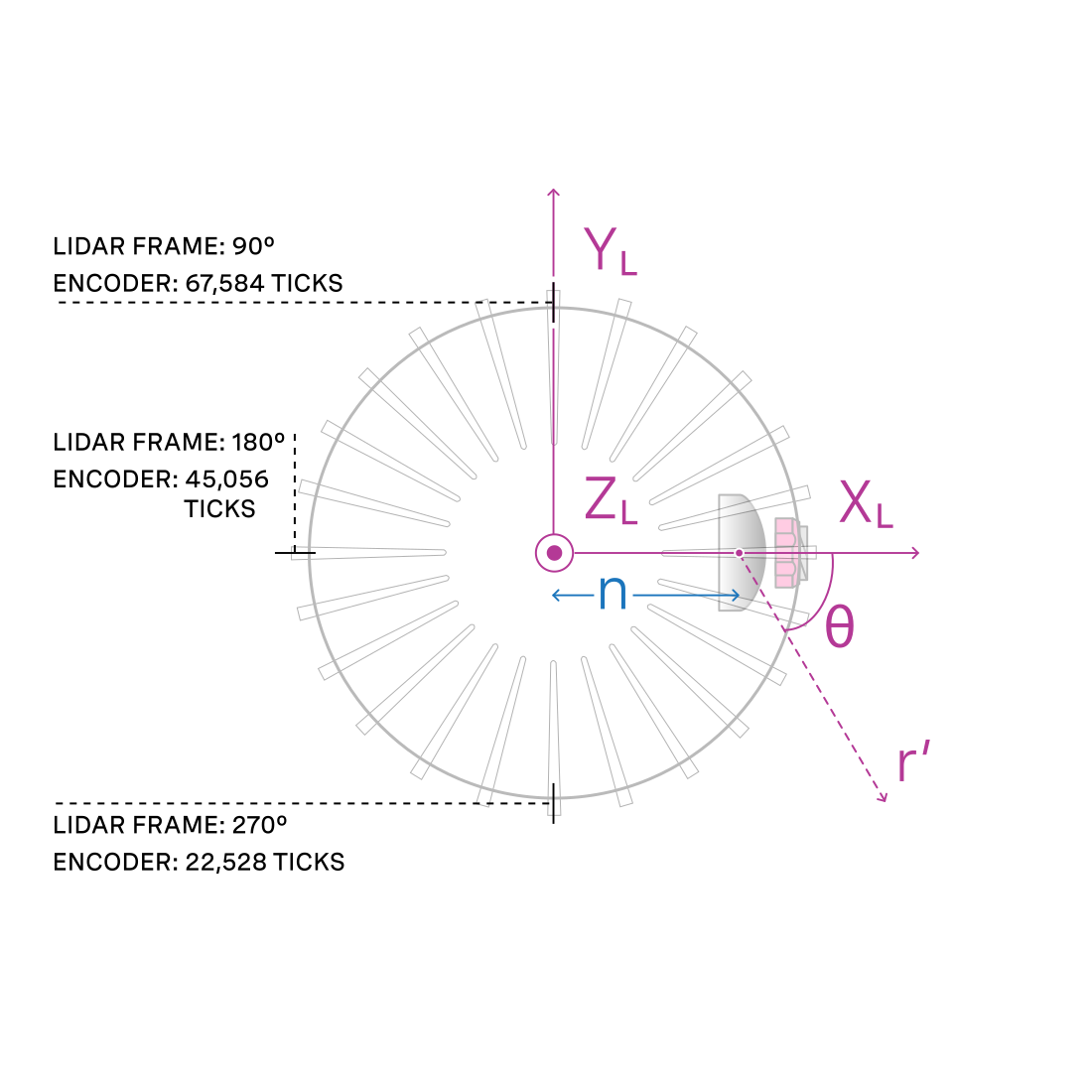
The Lidar Coordinate Frame follows the Right Hand Rule convention and is a point cloud-centric frame of reference that is the simplest frame in which to calculate and manipulate point clouds. The X-axis points backwards towards the external connector, which is an unintuitive orientation that was deliberately chosen to meet the following criteria:
-
Data frames split at the back of the sensor i.e. the external connector
-
Data frames start with the azimuth angle equal to 0°
All point cloud features including setting an azimuth window and phase locking are defined in the Lidar Coordinate Frame.
The Sensor Coordinate Frame follows the Right Hand Rule convention and is a mechanical housing-centric frame of reference that follows robotics convention with X-axis pointing forward. Ouster-provided drivers and visualizers represent data in the Sensor Coordinate Frame.
Note: All Ouster coordinate frames follow the Right Hand Rule, allowing for standard 3D transformation matrix math to convert between them. For multi-sensor systems that require calibration, this Linear Algebra-based approach can be convenient. However, customers with single-sensor systems may find it more intuitive to stay in the Lidar Coordinate Frame and take arithmetic shortcuts.
Lidar Coordinate Frame
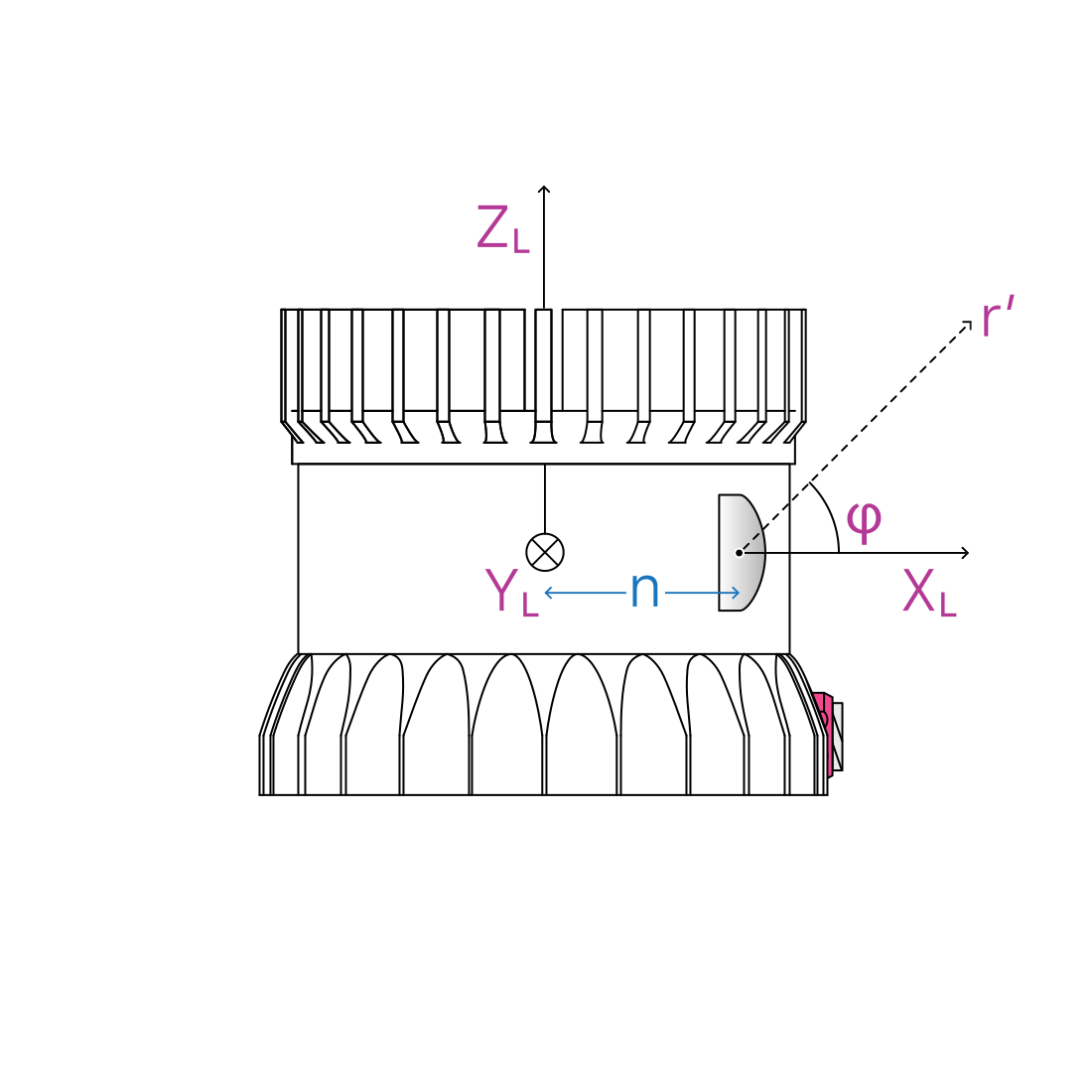
The Lidar Coordinate Frame is defined at the intersection of the lidar axis of rotation and the lidar optical midplane (a plane parallel to Sensor Coordinate Frame XY plane and coincident with the 0° elevation beam angle of the sensor).
The Lidar Coordinate Frame axes are arranged with:
- positive X-axis pointed at encoder angle 0° and the external connector
- positive Y-axis pointed towards encoder angle 90°
- positive Z-axis pointed towards the top of the sensor
The Lidar Coordinate Frame is marked in both diagrams below with X_L, Y_L, and Z_L.
Lidar Range to XYZ
Given the following information, range data may be transformed into 3D cartesian XYZ coordinates in the Lidar Coordinate Frame:
From a measurement block from the UDP packet:
Measurement IDvalue can be found on the lidar data packetscan_widthvalue of the horizontal resolutionrorrange_mmvalue of the data block of the i-th channelr'orrange_to_beam_origin_mm
From the beam-intrinsics HTTP Command:
beam_to_lidar_transformvaluebeam_altitude_anglesarraybeam_azimuth_anglesarray
The corresponding 3D point can be computed by
Sensor Coordinate Frame
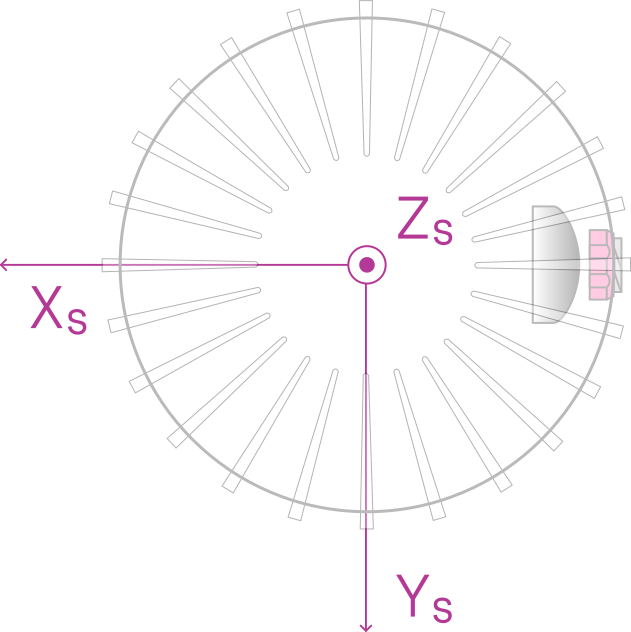
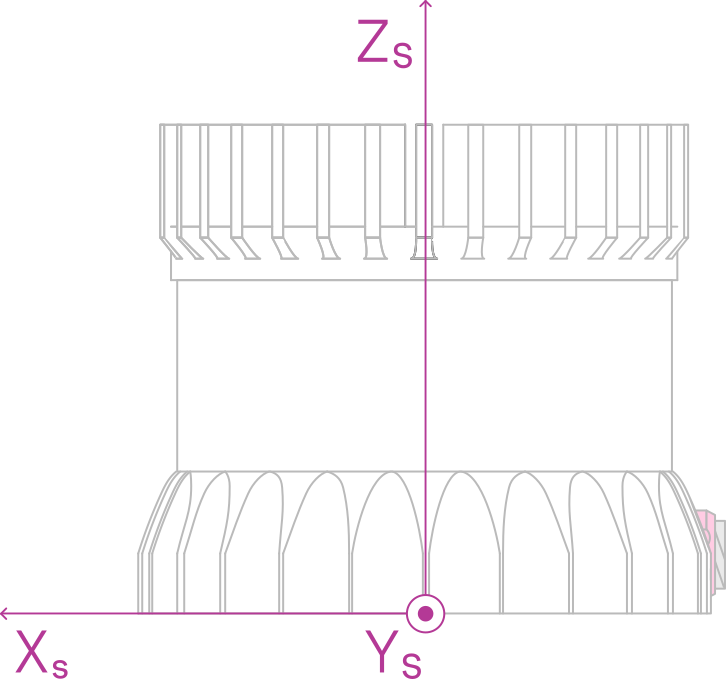
The Sensor Coordinate Frame is defined at the center of the sensor housing on the bottom, with the X-axis pointed forward, Y-axis pointed to the left and Z-axis pointed towards the top of the sensor. The external connector is located in the negative x direction. The Sensor Coordinate Frame is marked in the diagram below with X_S, Y_S, Z_S.
Combining Lidar and Sensor Coordinate Frame
The Lidar Coordinate Frame’s positive X-axis (0 encoder value) is opposite the Sensor Coordinate Frame’s positive X-axis to center lidar data about the Sensor Coordinate Frame’s positive X-axis. A single measurement frame starts at the Lidar Coordinate Frame’s 0° position and ends at the 360° position. This is convenient when viewing a “range image” of the Ouster Sensor measurements, allowing the “range image” to be centered in the Sensor Coordinate Frame’s positive X-axis, which is generally forward facing in most robotic systems.
The Ouster Sensor scans in the clockwise direction when viewed from the top, which is a negative rotational velocity about the Z-axis. Thus, as encoder ticks increase from 0 to 90,111, the actual angle about the Z-axis in the Lidar Coordinate Frame will decrease.
Lidar Intrinsic Beam Angles
The intrinsic beam angles for each beam may be queried with a HTTP command beam-intrinsics to provide an azimuth and elevation adjustment offset to each beam. The azimuth adjustment is referenced off of the current encoder angle and the elevation adjustment is referenced from the XY plane in the Sensor and Lidar Coordinate Frames. OS1-MAX sensors (256 channels) return beam angle arrays with one entry per channel.
Lidar Range Data To Sensor XYZ Coordinate Frame
Applications that calibrate against a precision mount or fuse IMU and lidar data must transform XYZ points into the Sensor Coordinate Frame. This requires a Z translation (the lidar aperture height above the sensor origin, which varies by model) and a 180° rotation about the Z-axis. Query this transform over HTTP as a homogeneous transformation matrix in row-major order.
Example JSON formatted query using the HTTP command lidar-intrinsics:
Which corresponds to the following matrix
IMU Data To Sensor XYZ Coordinate Frame
The IMU is slightly offset within the Sensor Coordinate Frame for mechanical reasons. Query the IMU-to-sensor transform over HTTP as a homogeneous transformation matrix in row-major order.
Example 1- Expected response for HTTP command imu-intrinsics when using Gen1 OS1 (all revisions), Gen2 OS01 (all revisions) and Gen2 OS2 (top-level revisions A, B, C)
Which corresponds to the following matrix
Example 2 — Expected response for HTTP command imu-intrinsics when using Gen2 OS2 (top-level revisions D and higher):
Which corresponds to the following matrix:
Configurable IMU Scale
The full-scale range (fsr) of the accelerometer and gyroscope is configurable. Toggle each between the default NORMAL and the wider EXTENDED range via the Web UI or by issuing POST /api/v1/sensor/config with accel_fsr and/or gyro_fsr in the body. Query the current value with GET /api/v1/sensor/metadata/imu_data_format. See the API reference for full schemas.
-
accel_fsr— accelerometer scale.NORMAL(default): X/Y/Z fixed at ± 2 g.EXTENDED: X/Y/Z extended to ± 16 g.
-
gyro_fsr— gyroscope scale.NORMAL(default): X/Y/Z fixed at ± 250 dps (°/sec).EXTENDED: X/Y/Z programmable to ± 2000 dps (°/sec).
Note: Switching to
EXTENDEDupdates the values reported in IMU packets accordingly, but can result in a slight loss of precision due to truncation of the least significant bits (LSB). Full IMU specifications are in the Sensor Datasheet.