

Thermal Alerts & Appendix
Thermal Alerts & Appendix
Shot Limiting — FW v2.5.x and Prior
The sensor alert system and thermal management are designed to ensure safe and robust operation in demanding environments. As the environment temperature gets higher, the sensor selectively reduces power consumption to ensure continued operation near the maximum temperature.
The sensor has five stages of operation related to high-temperature environments:
1 — Normal Operation Default state when temperatures are within the min/max specified in the datasheet. The sensor operates at full performance.
2 — Shot Limiting Zone Entered Entered when chassis temperature is within ~2°C of the maximum specified temperature. The sensor continues at full performance and produces an alert notifying that reduced performance mode may be imminent.
3 — Shot Limiting Active Entered when chassis temperature reaches the maximum operating temperature. The sensor continues to operate at reduced performance. The number of shots gradually decreases from 100% down to 50% until reaching the saturation temperature.
4 — Shot Limiting Saturated Entered when shots have been limited by 50%. The sensor continues to limit shots at 50% until the temperature rises approximately 5°C.
5 — Sensor Shutdown Entered when chassis temperature reaches the sensor shutoff temperature. The sensor shuts itself down to prevent damage.
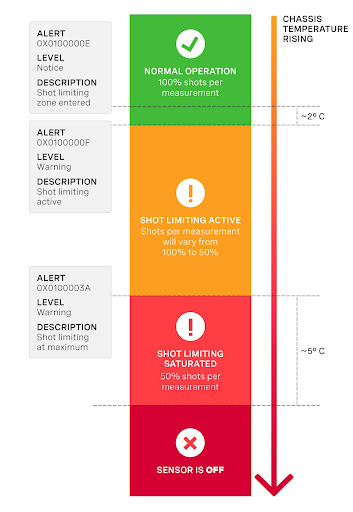
50% shot limiting means 50% of the signal, not 50% of the range.
Shot Limiting — FW v3.x and Later
Shot limiting is a process by which the sensor automatically enters a state to safely prolong operational performance in high-temperature conditions. The sensor has three operating states for managing high temperatures:
NORMAL (Status 0x00)SHOT_LIMITING_IMMINENT (Status 0x01)SHOT_LIMITING (Status 0x02 and greater)
In the NORMAL state the sensor performs to the range and precision specifications of the datasheet. When the sensor reaches a certain temperature, it enters SHOT_LIMITING_IMMINENT and issues alert 0x0100000E, indicating shot-limiting will commence in 30 seconds. After 30 seconds at elevated temperature, the sensor issues alert 0x0100000F and enters SHOT_LIMITING.
In shot limiting state, the sensor reduces power to the lasers to reduce thermal load. Range and precision may degrade by up to 30%. The sensor progressively increases shot limiting if the temperature remains elevated. If maximum shot-limiting is reached, alert 0x0100003A is issued.
If the sensor cools down while in SHOT_LIMITING_IMMINENT or SHOT_LIMITING, it returns to NORMAL.
An independent state machine handles thermal shutdown. When the sensor reaches the maximum operating temperature, it enters SHUTDOWN_IMMINENT and issues an alert in category OVERTEMP. If temperature remains elevated after 30 seconds, the sensor shuts down and issues alert 0x0100006B.
Refer to Max Operating Temperatures to learn more about maximum thermal performance.
Shot limiting status is reported in the configurable data packet header when udp_profile_lidar is set to:
- Single Data Return Format
- Low Data Return Format
- Dual Data Return Format
- FUSA_RNG15_RFL8_NIR8_DUAL Return Format
The following fields are present in the configurable data packet header:
- Shot limiting status [4 bit unsigned int] — Indicates the shot limiting status. Different codes indicate Normal Operation vs. Shot Limiting.
- Shutdown Status [4 bit unsigned int] — Indicates whether thermal shutdown is imminent. Set to 1 when shutdown is imminent; Thermal Shutdown Countdown is set to 30 seconds.
- Shot limiting Countdown [8 bit unsigned int] — Countdown from 30 seconds to indicate when shot limiting is imminent. Alert
0x0100000Etakes effect when this countdown begins. - Shutdown Countdown [8 bit unsigned int] — Countdown from 30 seconds to indicate imminent thermal shutdown. Alert
0x0100006Btakes effect when the sensor enters the ERROR state and stops outputting data.
Shot Limiting Status Flags
Appendix
Simple Thermal Model
- Use the sensor CAD from the Downloads page to define the control volume.
- Simulate the sensor as a conductive material, such as aluminum, with a single power source.
- Use the sensor product line datasheet to determine the power dissipated inside the control volume.
Power dissipation varies during startup, nominal operation, and in cold ambient temperatures.
OS0/1 Detailed Thermal Model
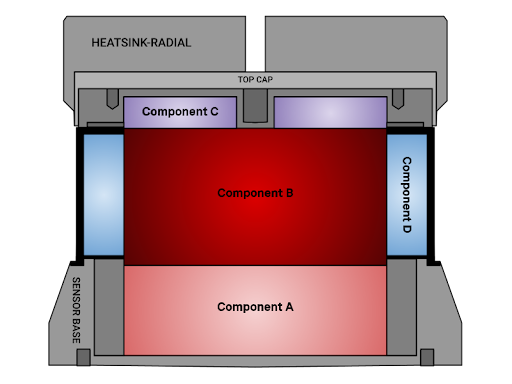
Assumptions for the Thermal Model:
- Use case is to add the Thermal Model to CAD/simulation software to conduct CFD simulation.
- Simulation is not transient — thermal capacitance and soak times do not need to be accurately estimated.
- Simulation estimates power dissipation at three external components: HEATSINK-RADIAL, WINDOW, and SENSOR BASE enclosure.
- Internal sensor temperatures do not need to be simulated.
- There is no contact resistance between components within the Thermal Model.
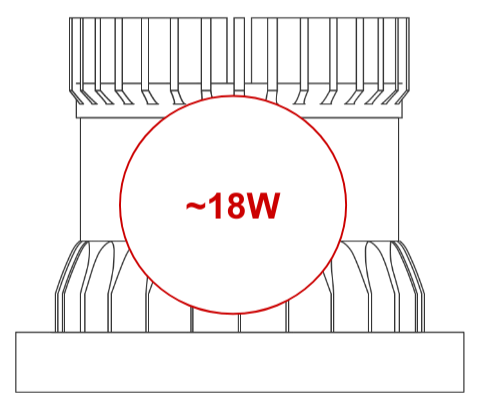
- The Thermal Model assumes 18W power dissipation — a conservative steady-state assumption at higher temperatures. Power draw is higher during startup and cold ambient conditions. Reference the relevant datasheet for startup and cold-temperature power draw.
Thermal Model Specifications
There is no contact resistance between components of the thermal model within the sensor control volume.
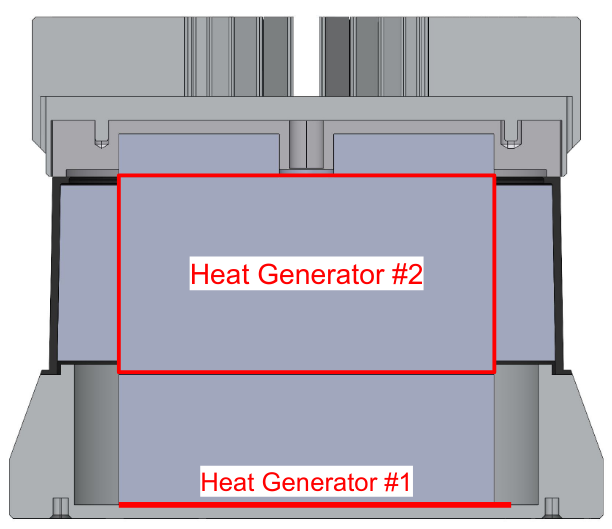
Heat Flux Interfaces
Supplemental Thermal Load Cases
Tables below provide load cases for Rev7 OS0/1 at limited FOV, signal multiplier modes, and higher temperatures. The OS0/1 draws lower power at higher temperatures.
The Ouster thermal team recommends using a simple 18 W total load as a conservative assumption when designing sensor mounting hardware, even at higher temperatures, to simplify analysis and add design margin.
Normal Operation at Room Temperature
Normal Operation Near Shot Limiting Temperatures (53°C)
Full Shot Limiting Operation Near Shutdown
Shot Limiting and Shutdown Plots (Rev7)
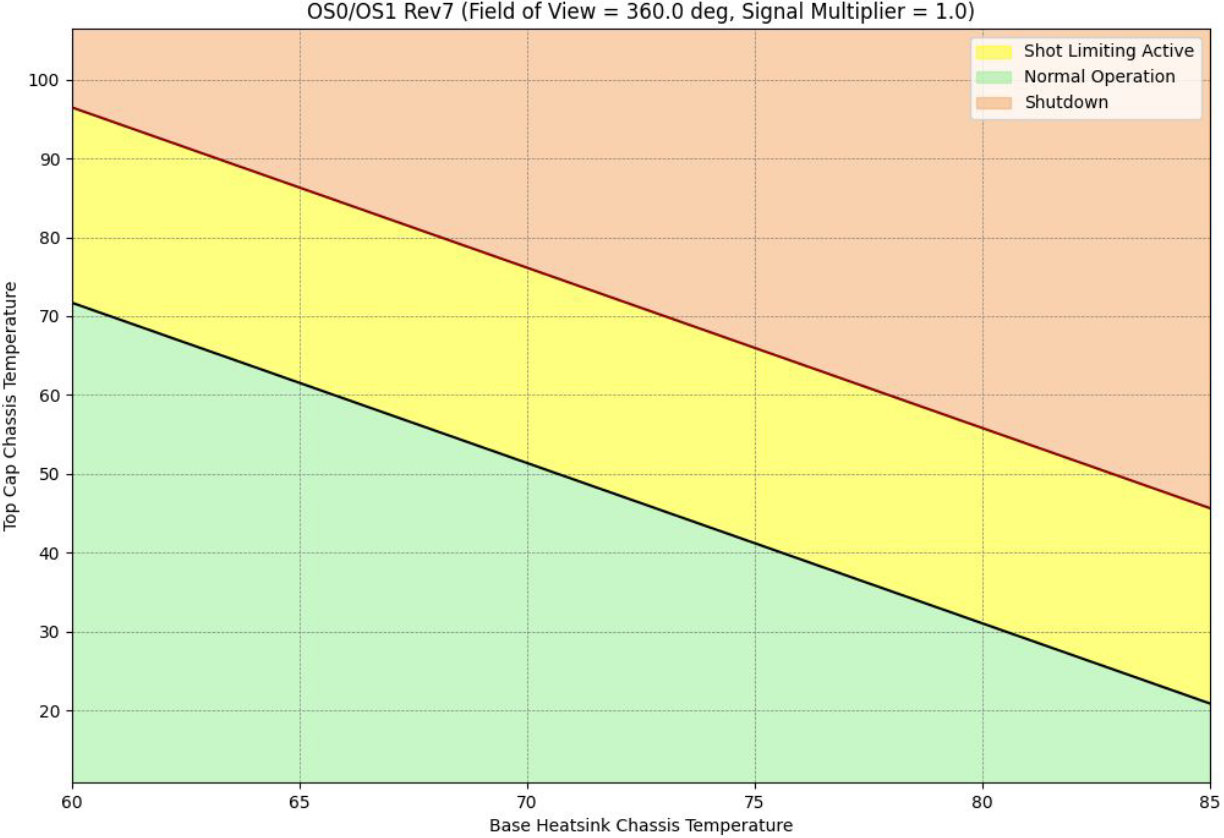
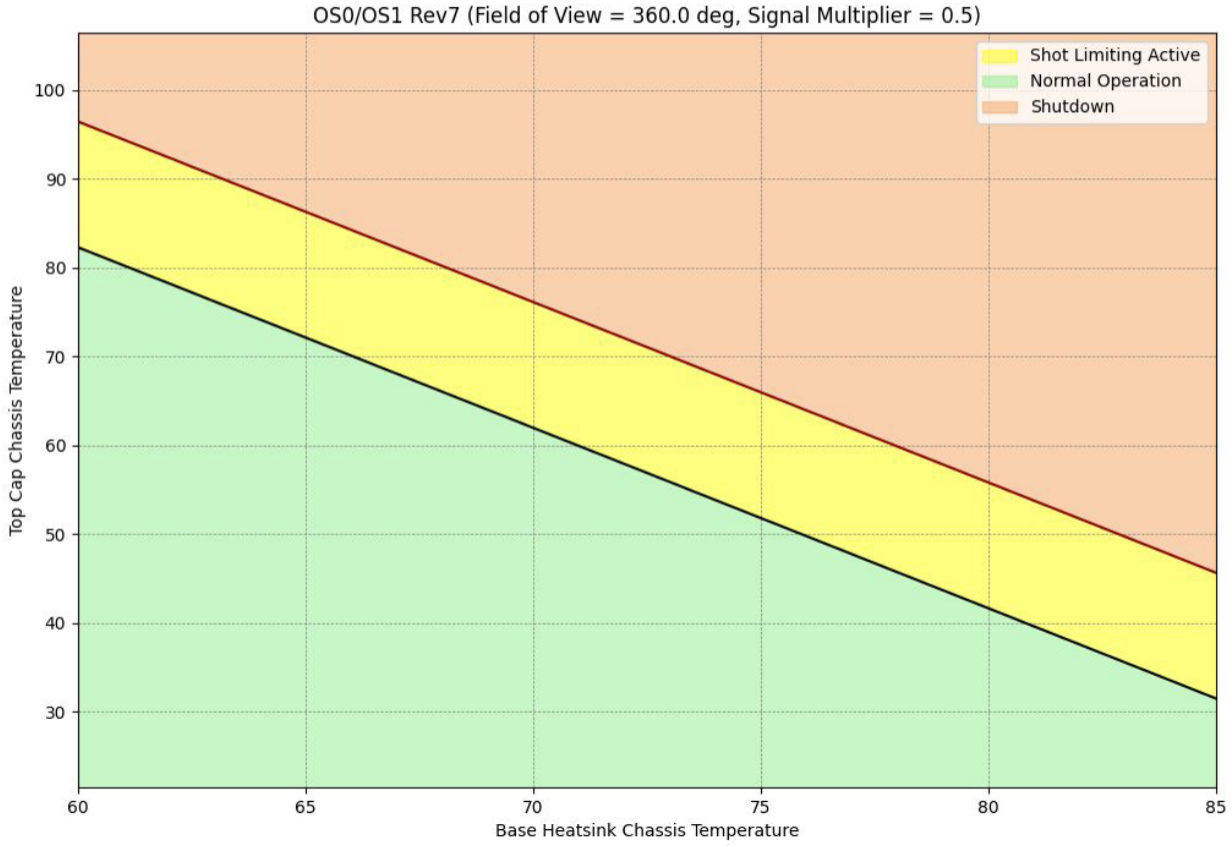
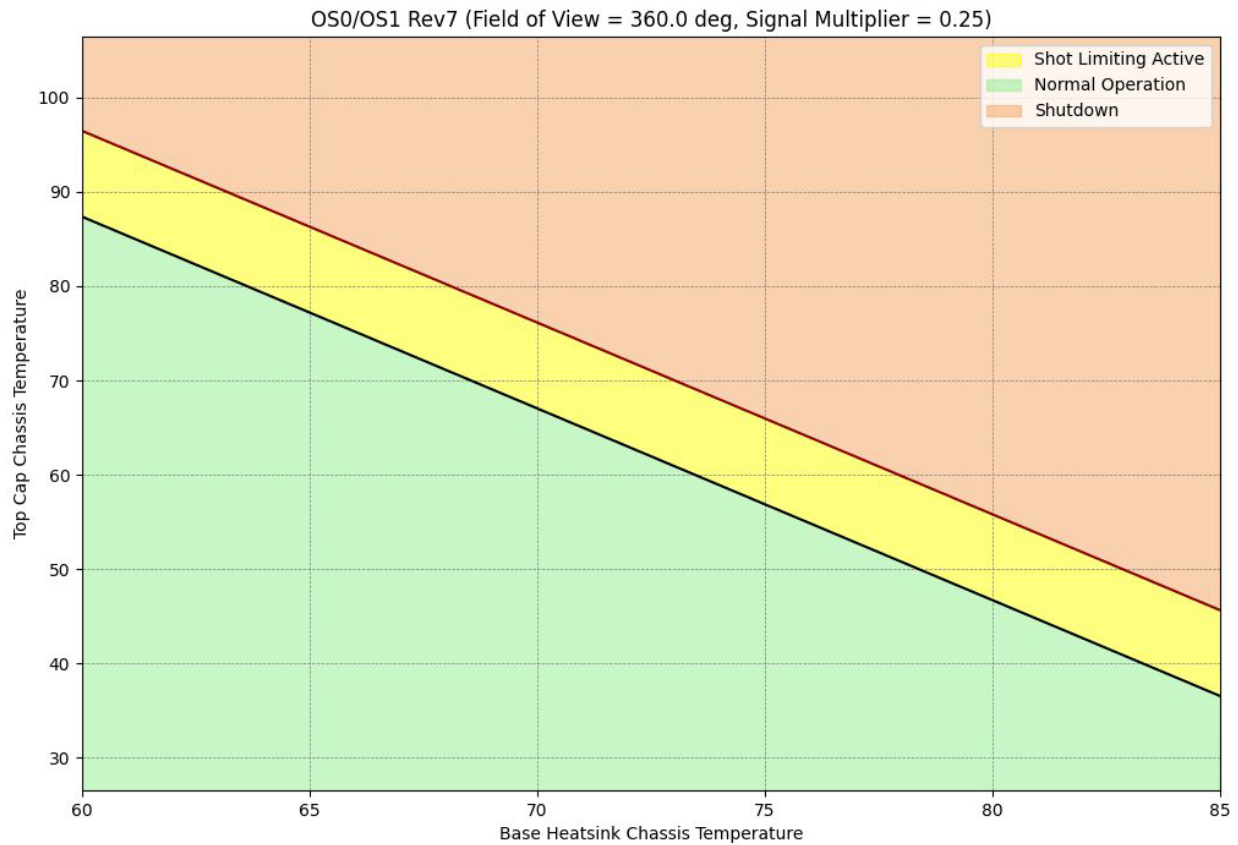
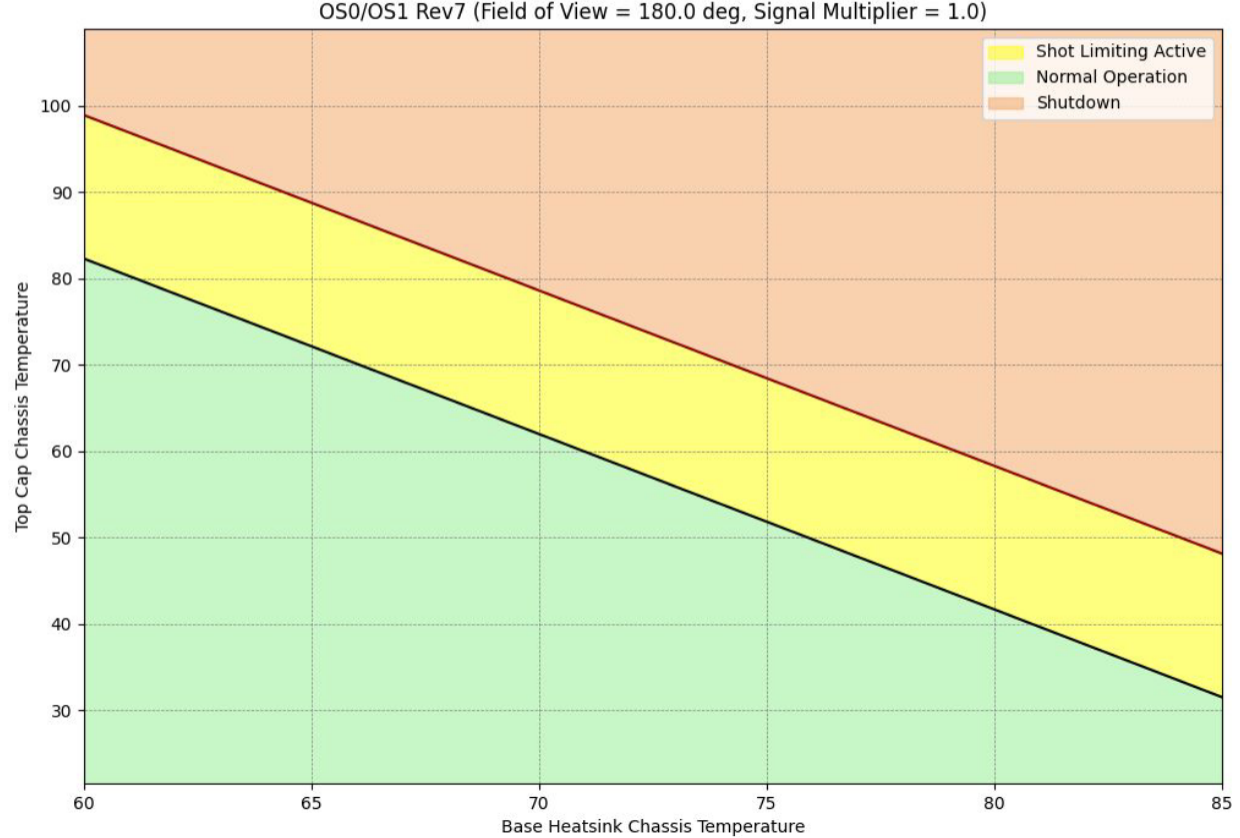
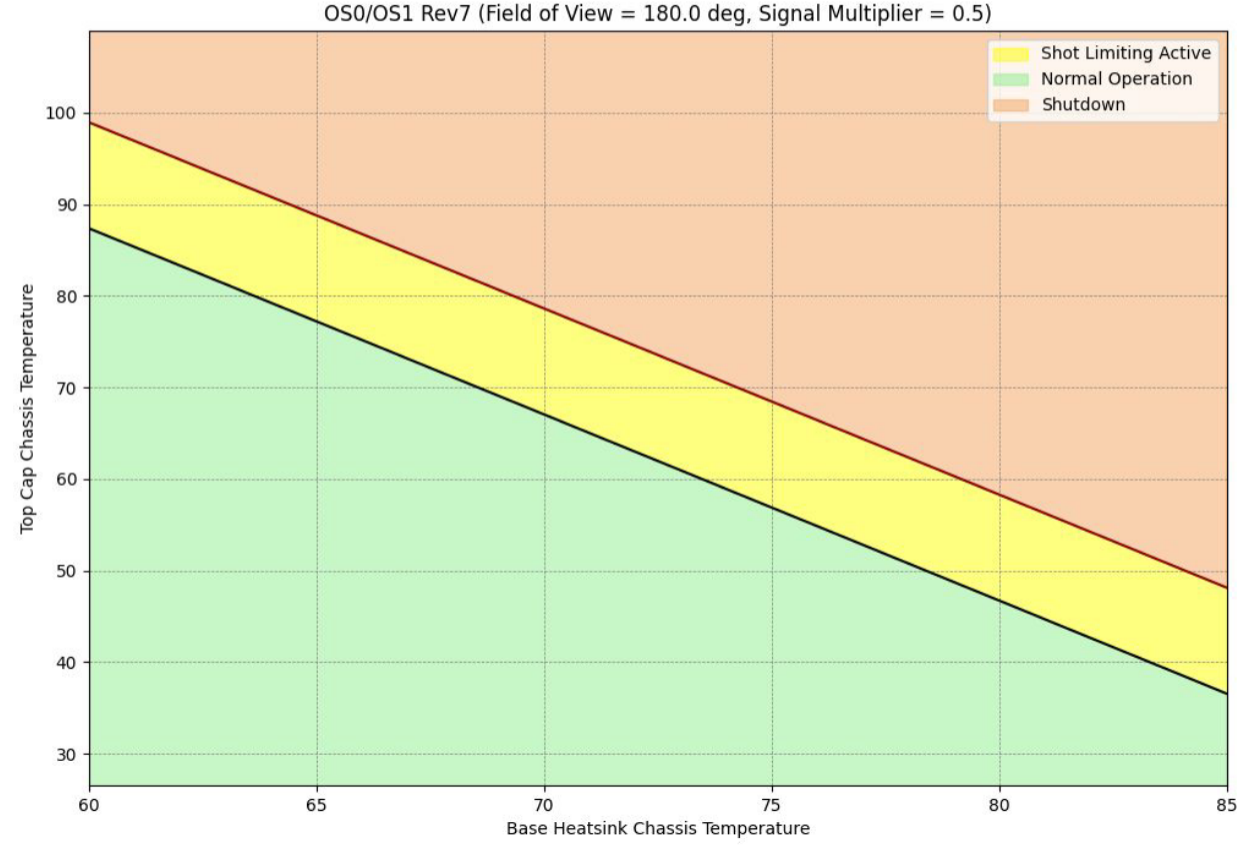
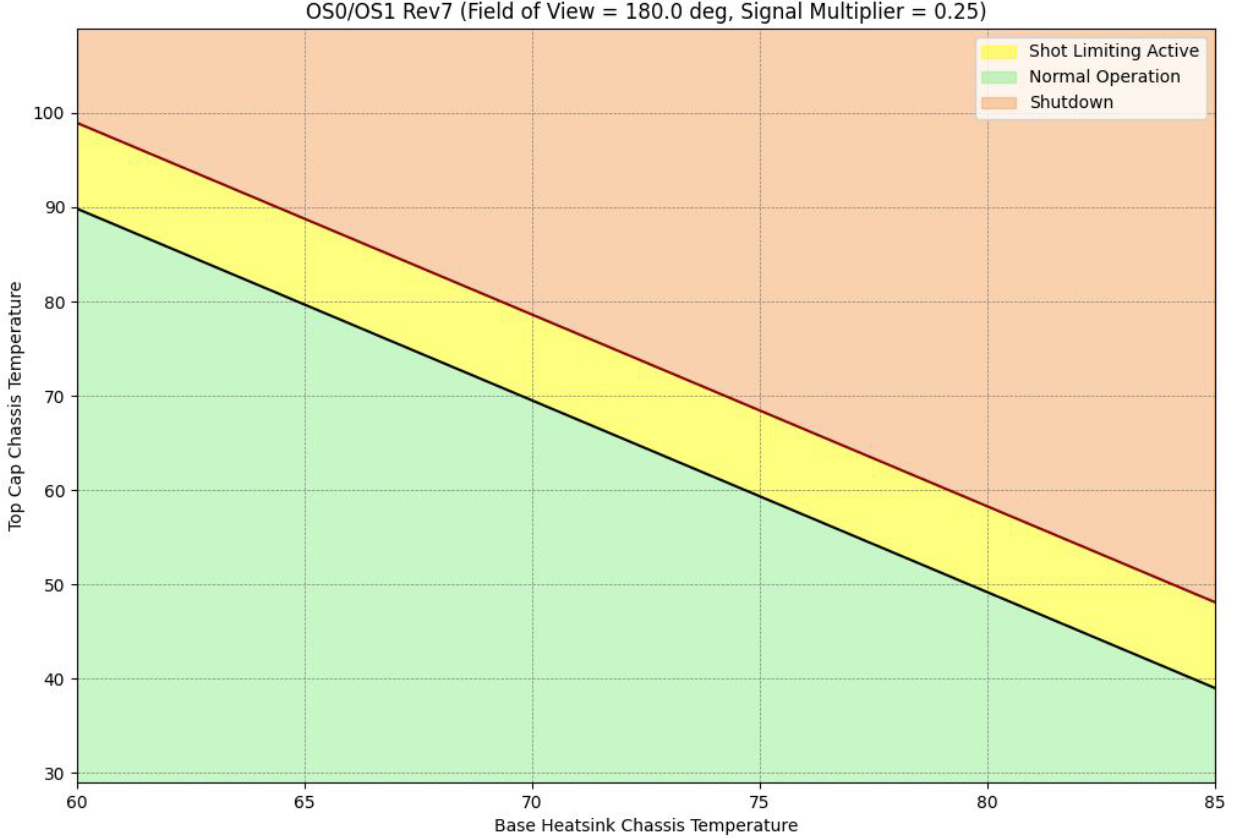
The following graphs show expected shot limiting and shutdown limits based on base enclosure bottom surface temperature and top cap surface temperature. Data is available for Rev7 sensors only.
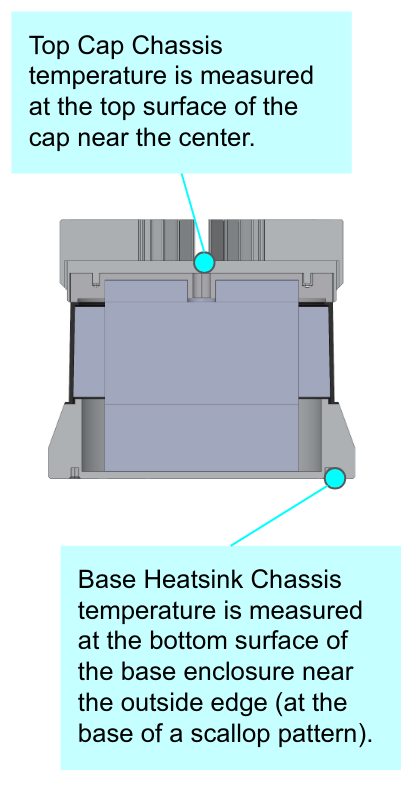
Measurements were taken with thermocouples at the Top Cap Chassis and Base Heatsink Chassis positions:
FOV = 360°, Signal Multiplier = 1
FOV = 360°, Signal Multiplier = 0.5
FOV = 360°, Signal Multiplier = 0.25
FOV = 180°, Signal Multiplier = 1
FOV = 180°, Signal Multiplier = 0.5
FOV = 180°, Signal Multiplier = 0.25
Sunshade Concept Design
A simple sunshade concept design is available to help mitigate solar load. It attaches on top of the modular cap using the existing mounting holes.
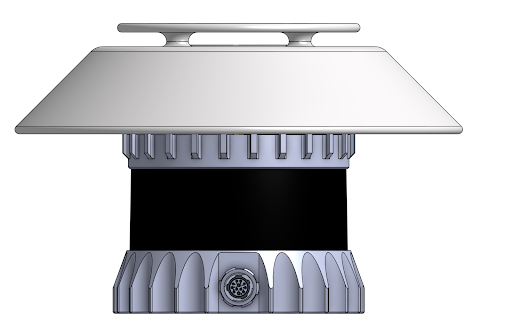
- The modular cap (HEATSINK-RADIAL or HEATSINK-HALO) must remain attached to the TOP CAP. Replace the original M3-0.5×5 mm screws with longer M3-0.5×30 mm standoffs.
- This concept is only for sensors with modular caps that have four mounting holes interfacing with the TOP CAP: 840-101855-03 (Gen1 OS1), 840-102144-A/B/C/D/5/6/7 (Gen2 OS0), 840-102145-A/B/C/D/5/6/7 (Gen2 OS1).
- This version is designed not to occlude any beams on a Gen2 OS1-128 with 45° VFOV. Modify the design for wider VFOVs (90°) or more shade.
This design is provided as inspiration and has not been validated by Ouster.
The CAD model is available on OnShape for iteration and fabrication.
Supported Products
Firmware 2.5.x — OS0, OS1, OS2:
- GEN1: P/N 840-101-XXX-XX
- Rev C: P/N 840-102-XXX-C
- Rev D: P/N 840-102-XXX-D
- Rev 05: P/N 840-102xxx-05
- Rev 06: P/N 840-102xxx-06
- Rev 7: P/N 860-10xxxx-07 (OS2 Only)
Firmware 3.1.x — OS0, OS1, OSDome:
- Rev 7: P/N 860-10xxxx-07